GOOGLE ADS BUDGET CALCULATOR

Know exactly how much tospend on Google Ads

Stop guessing and start planning. Enter your metrics below to calculate the perfect budget for your lead generation goals.

$
2.5%
0.5%15%

Recommended Budget

Optimized for ROI

$219/day

Cost Per Lead

$110

Est. Clicks

~46

💡 Pro tip: Improving your Quality Score from 5 to 10 can reduce your CPC by up to 50%, stretching your budget further.

Stop guessing and
start knowing

Most business owners throw money at Google Ads without knowing if they're spending too much or too little. That uncertainty costs you real money.

With this calculator, you can see exactly how much budget you need to hit your lead goals. No more hoping your campaigns will work.

Plan with confidence. Know your numbers before you spend a single dollar.

Get Expert Help
4.8 stars out of 136+ reviews

Get your Google Ads budget right, finally

You've heard the saying: you have to spend money to make money. But how much should you actually be spending on Google Ads?

It's easy to sink money into campaigns without a practical plan, hoping for the best. But the uncertainty can take its toll.

Imagine knowing exactly how much to spend to get the leads or sales you need. Our free Google Ads budget calculator does just that. Plug in your metrics and get an actionable roadmap for your ad spend.
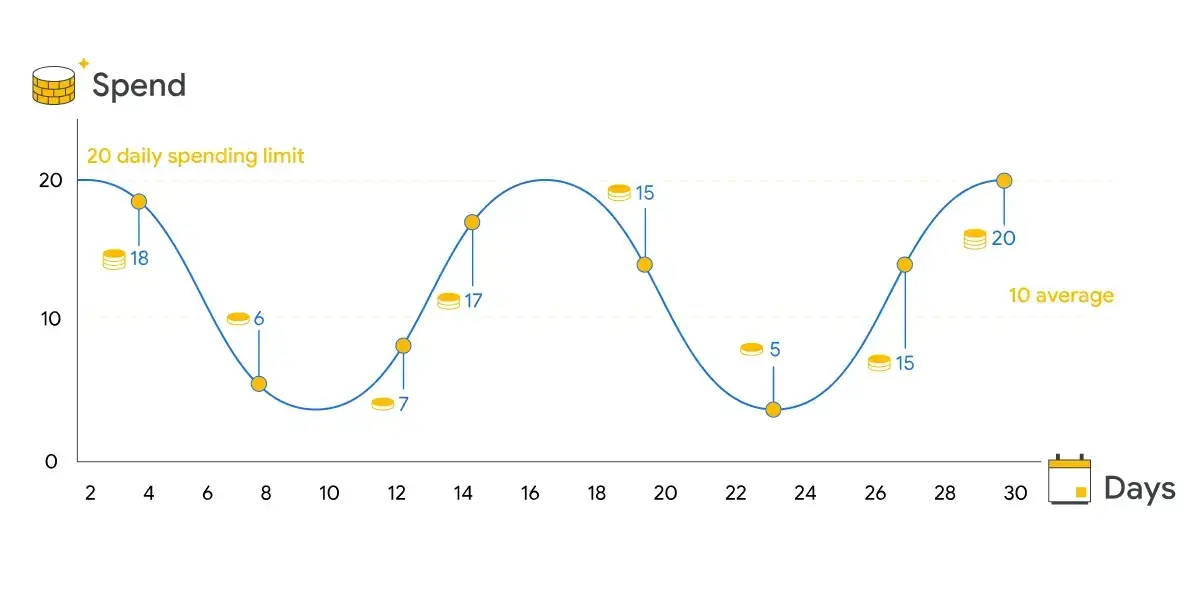
Google Ads daily spend chart showing budget fluctuations

Questions we get asked about
Google Ads budget planning

A Google Ads budget calculator is a tool that helps you estimate how much you should spend on Google Ads to achieve your lead generation goals. It uses your average cost per click (CPC), conversion rate, and desired number of leads to calculate the optimal daily, monthly, or annual budget for your campaigns.

This calculator gives a sensible starting estimate based on the metrics you input. Real-world results vary with industry competition, seasonality, ad quality, landing page experience, geo targeting, and device.

One pattern worth flagging: of the ~200 Google Ads accounts Josiah audits a year, about 9 in 10 are misconfigured somewhere, usually match types, conversion tracking or geo targeting set to Google's default "Presence or interest". That misconfiguration alone can throw real CPC and conversion rate 30–50% off whatever a calculator predicts.

Use the number here as a planning floor, then validate against actual data once campaigns are running.

You need three key metrics:

  1. Average CPC: Find this in your Google Ads account under Keywords or use Google's Keyword Planner for estimates.
  2. Conversion Rate: Check your landing page analytics or use industry benchmarks (typically 2-5% for most industries).
  3. Daily Lead Goal: How many leads or conversions you want to generate each day.

Yes, this calculator is completely free. There's no signup required and you can use it as many times as you need. I built it to help business owners make informed decisions about their advertising budgets.

Several strategies can boost your conversion rate:

  • Improve landing page load speed
  • Create compelling, benefit-focused headlines
  • Add social proof (testimonials, reviews, trust badges)
  • Simplify your forms to reduce friction
  • Ensure mobile responsiveness
  • Use specific, action-oriented CTAs
  • A/B test different page elements

CPC (Cost Per Click) is the amount you pay each time someone clicks your ad. To find your average CPC:

  1. Log into Google Ads
  2. Go to Campaigns or Keywords
  3. Look at the 'Avg. CPC' column

If you're new to Google Ads, use the Keyword Planner tool to see estimated CPCs for your target keywords.

Absolutely. Toggle between daily, monthly, and annual views to plan budgets for different timeframes. Keep in mind that CPCs and conversion rates can fluctuate seasonally, so review and adjust your projections quarterly.

Several factors can cause variance:

  • Quality Score: Higher scores can reduce your actual CPC by up to 50%
  • Competition: Auction dynamics change constantly
  • Ad Relevance: Better ads get more clicks at lower costs
  • Landing Page: Conversion rates depend heavily on page quality
  • Seasonality: Some industries see major swings throughout the year

At minimum every quarter, and any time CPC or conversion rate shifts more than 20% from your baseline. Competitors change bids, Google's algorithm updates, seasonality moves, and irrelevant searches creep in without negative-keyword maintenance.

We install Site Behavior, our proprietary AI dashboard for CAC / ROI / CPL by channel, and WhatConverts for lead and sale-value tracking, with Fraud Blocker on every Google Ads account, so the recalculation is grounded in real lead and sale data rather than top-of-funnel guesswork.

Minimum recommended ad spend is $1,000/mo; more usually compounds faster. Full inclusions and pricing for ongoing optimisation live on the pricing page.

If you're a local service, healthcare or professional services business, law firm, dental, physio, plumbing, home + professional services, in the $1M–$10M revenue range, almost always yes. There are 500+ moving parts in a Google Ads account, and no two accounts in the same niche are configured the same way.

We bill on a retainer in packets of hours, with a 3-month plan that starts the day or day after you pay. Onboarding goes through our proprietary project-management tool, with weekly 1:1s where Josiah owns strategy. We guarantee we'll beat your current CTR, CAC, ROI or conversion rate inside 90 days. Retainer-fee refund only applies if you pay 3 months upfront.

If you're a pre-revenue startup, brand-new e-commerce, B2B SaaS without long-term commitment, or asking for guarantees on day one, this isn't the right fit and we'll say so on the call.

Conversion rates vary significantly by industry:

  • Legal: 2-4%
  • Healthcare: 3-5%
  • Home Services: 4-8%
  • E-commerce: 1-3%
  • B2B Services: 2-5%

If your rate is below these benchmarks, focus on landing page optimization before increasing budget. A digital marketing audit will surface exactly where conversions are dropping off.

Quality Score directly impacts your costs. A score of 10/10 can reduce your CPC by up to 50%, while a score of 1/10 can increase it by 400%. To improve Quality Score:

  • Ensure tight keyword-to-ad relevance
  • Write compelling ad copy with your keywords
  • Create fast, relevant landing pages
  • Maintain strong click-through rates