

You’re missing out on some serious traffic if you’re not using dynamic keyword insertion (DKI) in your PPC campaigns.
DKI allows you to automatically insert a searcher’s query into your ad copy, giving your ads a personal touch that can result in higher click-through rates (and quality scores).
In this post, I’ll discuss why DKI is an essential tool for any Google Ads (previously Google Adwords management) campaign and how it can dramatically improve performance.
Without further ado, let’s dive in!
What is Dynamic Keyword Insertion?
As mentioned above, DKI allows you to dynamically insert a keyword that someone types into Google right into your ad.
Meaning that your ads will be personalised to the person searching for something on Google, resulting in a higher click-through rate (CTR) on all your ads.
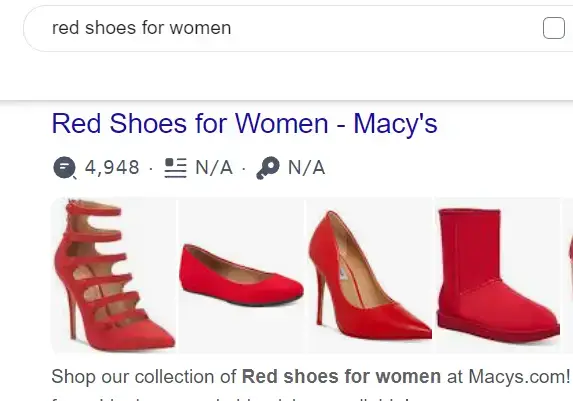
For example, if someone searches for red shoes for women, they would see the following ad:
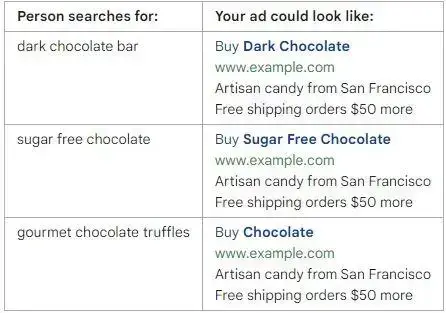
Here’s another example.
Let’s say you sell chocolate bars.
Using DKI text ads would allow you to change the word “chocolate” in your advertisements to better match the different types of chocolate bars that you sell, rather than creating separate ads for each product.
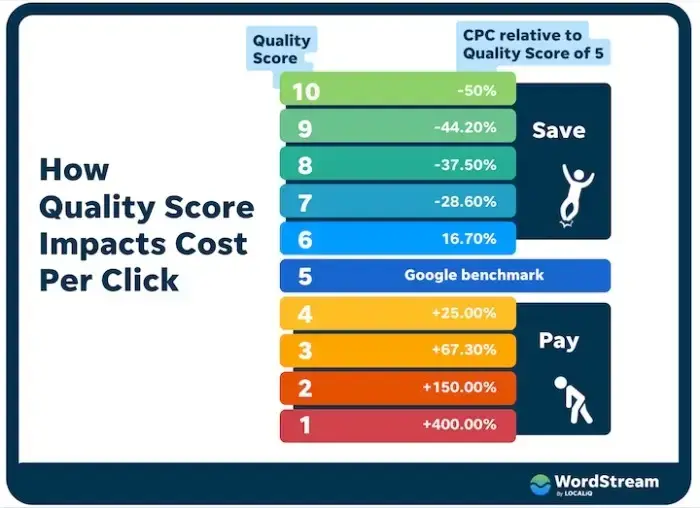
By following Google’s best practices, advertisers receive discounts on their ads.
Why?
Because doing so bumps up your quality score.
And when your quality score is high, your ad is more relevant to what the searcher is looking for—which just happens to be Google’s business model.
How can I use DKI in my ads?
Setting up your DKI ads is super easy.
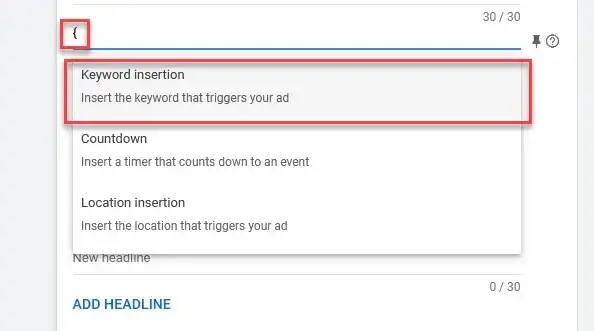
To start, go to your Google Ads search ad and find the ad headline or description you want to insert every keyword into.
Type the symbol { to activate Google’s guided insertion function (a.k.a.
DKI code).
If your search term is more than 30 characters long, it will not appear in your ad.
So Google has a backup headline to use in case this occurs, which is Default Text (a.k.a. default keyword).
The best way to format your text so that it fits its purpose is by using Title Case, Sentence Case, or Lower Case.
In my opinion, the smartest choice would be to go with Title Case.
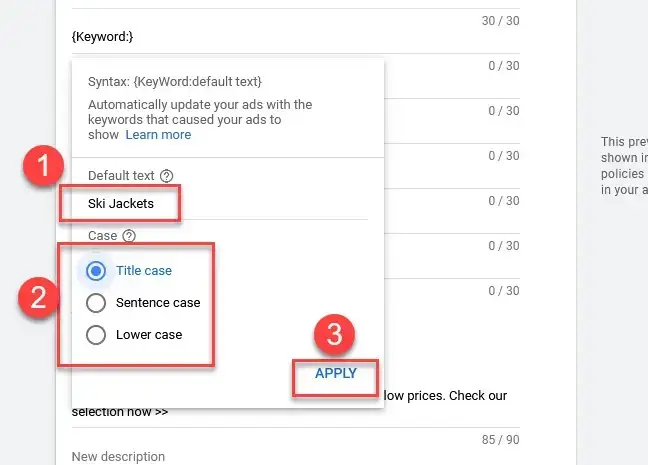
Always preview your dynamic keyword insertion copy to avoid any surprises.
Bad things can happen if you don’t have your headline pinning set up correctly.
4 benefits of dynamic keyword insertion
- Higher CTRs: By personalising your ad copy to the searcher’s exact search queries, your CTRs will likely skyrocket. I’ve seen this happen time and time again.
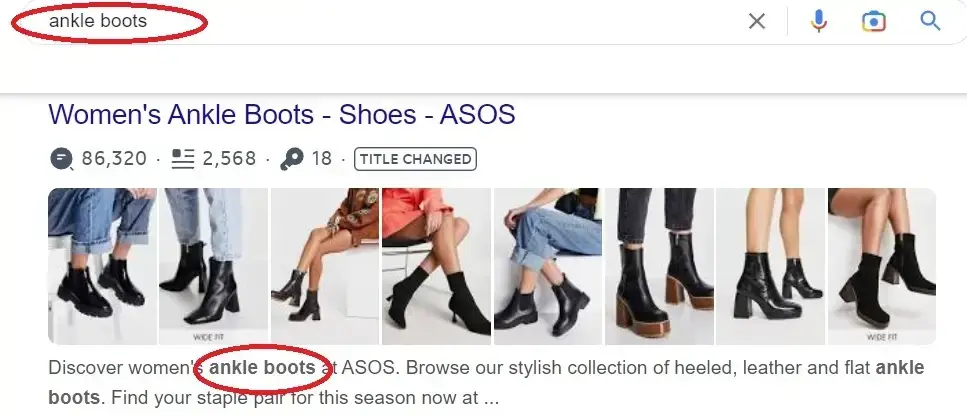
- Bolded Text: Google bolds dynamically inserted terms based on keywords in your audience‘s query. Making your ad stand out, increasing the likelihood that the user will be likely to click.
- Easier Management: By investing a little more time into paid ads strategy from a Google Ads specialist, you can use one ad to target several related thematic keywords in your ad group, saving more resources in the process.
3 DKI mistakes you need to avoid immediately
Dynamic ads can be rewarding, but certain practices can easily undo all your hard work.
Here’s everything you need to know about insertion strategies that can hurt your ads:
Awkward wording
DKI is not the best tool for bidding on misspellings, as Google won’t publish such ads.
For example, if you’re running a competitor interception campaign, you could be bidding on other competitor brand names.
But depending on your headline positioning (ad text), it could accidentally say “COMPETITOR NAME + Best in the X Industry”.
Trust me, I’ve seen this actually happen.
It can be embarrassing.
This can also happen if you’re bidding on search queries with broad match keywords.
Trademark infringement
Your ads will likely be flagged for trademark violation if you bid on your competitor’s product name that is under a trademark.
So what counts as trademark infringement?
Basically, if you’re using someone’s trademark in a way that confuses consumers, you could be infringing on their trademark.
That means using someone’s trademark in your ad could lead to a lawsuit if the consumer is confused about who the ad is coming from.
So if you’re thinking about using someone else’s trademark in your ad, make sure you have permission first; otherwise, you could be in a world of legal trouble.
Keep in mind not all competitors have necessarily trademarked their brands yet, so competitor campaigns still work.
Bids on long-tail keywords
Google allows 30 characters for headlines, 90 for descriptions, and 15 for URL paths.
If your keyword (from your keyword list) exceeds this limit, you won’t be able to use it in your ads.
If you want to include a long-tail keyword in your ad, try rephrasing it in fewer words or breaking the phrase into separate words.
This way, you’ll still be able to target the same long-tail keyword without exceeding the character limit.
Just make sure that your ads have high relevancy and are accurate so that customers don’t click expecting one thing and get something completely different.
DKI FAQs
Do dynamic keyword insertions hurt conversions?
The answer is no.
Dynamic keyword insertions do not hurt your conversions.
In some cases, advertisers have seen more than 288% increased conversion rates by implementing DKI into their strategies.
That’s because dynamic keyword insertion can help to ensure that the exact search term (or closely related terms) being used by potential customers is inserted into your ad copy.
This makes it easier for them to find exactly what they are looking for, and it increases your chances of getting more qualified leads.
How to use dynamic keyword insertion in Google Ads
All you need to do is head over to the ad you’d like to add DKI to.
Click edit.
Choose the headline or description that you’d like to add dynamic keywords or locations.
Finally, type the { symbol into the text area.
Google will then present you with a list of options based on keyword, location, or event.
Feel more informed about Google Ads dynamic keyword insertion?
Dynamic text insertion can be an incredibly powerful tool for your Google Ads campaigns — if you use it the right way.
It allows you to personalise your ads and easily target related thematic keywords, resulting in higher quality scores, higher click-through rates, and better placement of ads on SERPs.
Remember to preview your ad copy when using dynamic keyword insertion to avoid surprises.
Avoid awkward wording, trademark infringement, and long-tail keywords that exceed the character limit.
Give it a go and see how dynamic keyword insertion can help you improve your ROI.