
Scroll through social media and you see their ads everywhere.
Click on search results, and boom…
There they are again.
You know that you shouldn’t stop running Google Ads for your business.
But your competitors’ ads are just friggin’ everywhere, grabbing everyone’s attention (and most probably, their money).
There’s a way to turn things around.
And you won’t have to rely on dirty tricks or stealing customers.
The secret: clever and effective targeting.
This guide will show you how to target your competitor’s audience on Google Ads — ethically.
I’ll show you three ways to reach people who are already interested in what you’re selling.
3 ways on how to target competitors audience on Google Ads
Now, let’s talk about three ways to go head-to-head with competing businesses without any shady tactics.
Way #1 – target people who visit their website
People are already searching online for things you sell.
Chances are, they’ve already checked out your competitor’s website.
This technique lets you reach those same people and show them what you offer, too.
After all, they might be interested in seeing what else is out there before they make a decision.
Step 1 – identify your competitors and your goals.
Before diving in, figure out who your online competitors are.
Make a list of the websites offering similar products or services.
Next, think about what you want to achieve with your campaign.
More website visits?
More downloads for your lead magnet?
More online purchases and conversions?
Figuring out your goals upfront helps with your SEM strategy later on.
Step 2 – build your audience
On your Google Ads account, go to Audience Manager and build a custom audience.
Select “People who browse websites similar to” as your targeting criteria.
This lets you cast a net towards people who have visited your competitors’ websites.
Place their URLs there, one by one.
As an optional step, check out Audience Insights to see the demographics and interests of people who typically visit those sites.
While not exactly part of this step, this info can help you in crafting your ad copy later on.
Step 3 – launch and monitor your ads
Once you’re happy with your targeting settings, give your custom audience a descriptive name.
This makes it easier for you to keep using this custom audience for your next display, discovery, or video campaigns.
Then, finalise your budget and run your ads.
If this is the first time you’re doing this, make sure you keep an eye on how this audience performs within your campaign.
Track things like your clicks-through rate and conversion value.
Based on what you learn, you can adjust your targeting or even your entire digital marketing strategy to get even better results.
Way #2 – target people searching for your competitor’s keywords
By using the same search terms and keywords that your competitors use, you can get your offers in front of those customers, too.
You’re basically strategically intercepting a highly interested audience.
These could also be people who your competitor has already put some effort into warming up.
And now, as they’re a bit farther along in their search, you can place your ads front and center.
Step 1 – find your campaign or ad group
Open your Google Ads account and find the campaign or group of ads that you want to use.
Of course, you can always create another audience particularly for this campaign.
Step 2 – plug in your competitor’s keywords
Select “People who search for any of these terms on Google” as your targeting criteria.
Then, start typing in those competitor keywords.
Think of it like adding things into a shopping list, except you’re shopping for things that customers might look for.
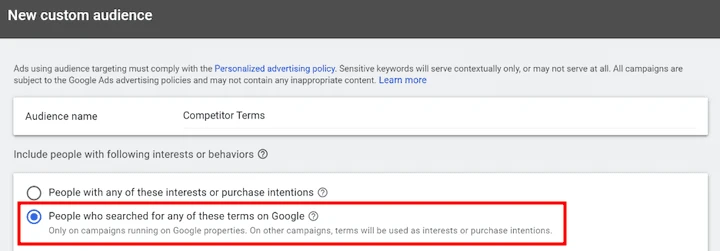
Google Ads also lets you set the match types for these searches.
It’s good to set them to “phrase match” or “exact match” for more precise targeting.
When I launch these intercept campaigns, I also create a separate group just for these competitor keywords.
It keeps things separate from other brand campaigns that I run.
It also makes it easier to set different bidding strategies for competitor campaigns later on.
Once you’re all set, hit launch and let your campaign go live.
As always, do regular ads audits to see how things go and apply needed to get the most bang for your buck with those competitor keywords.
Way # 3 – target people looking for specific brand names
This is, perhaps, the most sure-fire way to target competitors’ audience.
This technique actually lets you target the persona who are actively searching to buy from your rivals.
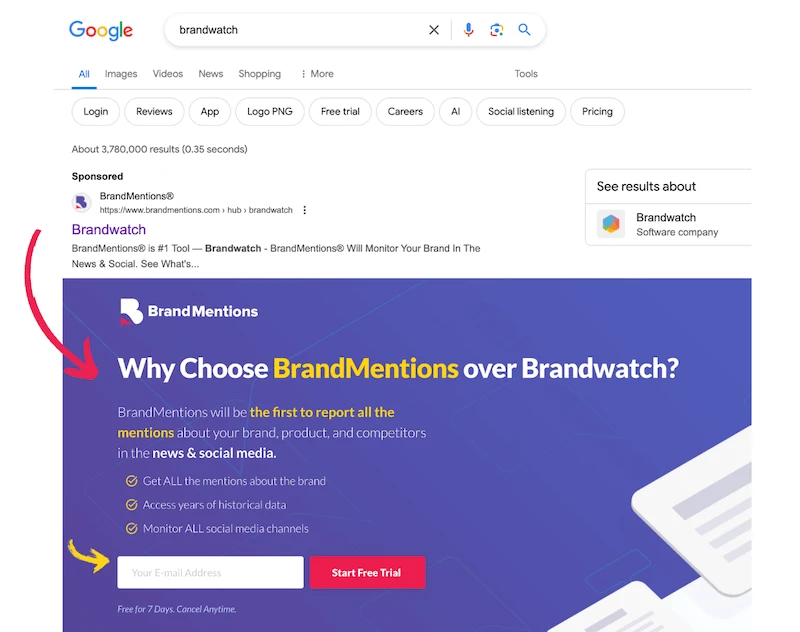
To set it up, find the “Keywords” tab within your ad group settings.
On the field, carefully type in your competitor’s brand name.
Include possible misspellings that customers might make.
You can do the same for specific product or service names.
Again, doing this will effectively put your ads in front of your competitors’ audience.
But it doesn’t mean that your job is done.
Since people already know your competitor (and are already interested in buying from them), your ad needs to be super convincing.
Use ad copy and visuals that highlight why you’re a better option.
Make sure that your landing page is optimised for conversion.
In cases like this, you’ll also have to be upfront.
Let them know exactly who you are – and why their search for your competitor made your ad pop up.
And before you jump in, make sure that you review the Google Ads trademark policies.
Always double check these guidelines to avoid issues.
After all, you want to get more sales – not get banned.
Bonus tip – refine your strategy with Google Ads Transparency Center
Sure, showing your ads to people looking for your competitors can grab their attention.
But that’s just the first step.
Audience interception is a powerful way to grow your business.
And the key is to do solid research on their efforts.
By figuring out your competitors’ strategies, you can get a leg up.
It’s like getting pointers for your own ads.
You can see what’s working for them and use it to craft even better strategies for your own business.
And to do just that, you can check out the Google Ads Transparency Center.
It’s a powerful tool for ethically getting ideas on how to write your ads better for interception campaigns.
Plug and Play
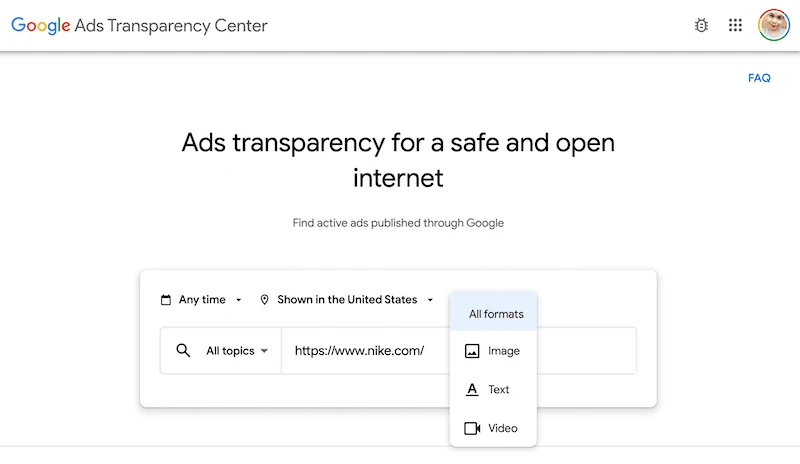
Just head over to the Google Ads Transparency Center.
It’s already set to search for all types of ads on pretty much everything.
You can also adjust the settings on duration, location, and format if you want to get specific.
Decipher the code
Once you search for your competitor, you’ll see all their ads.
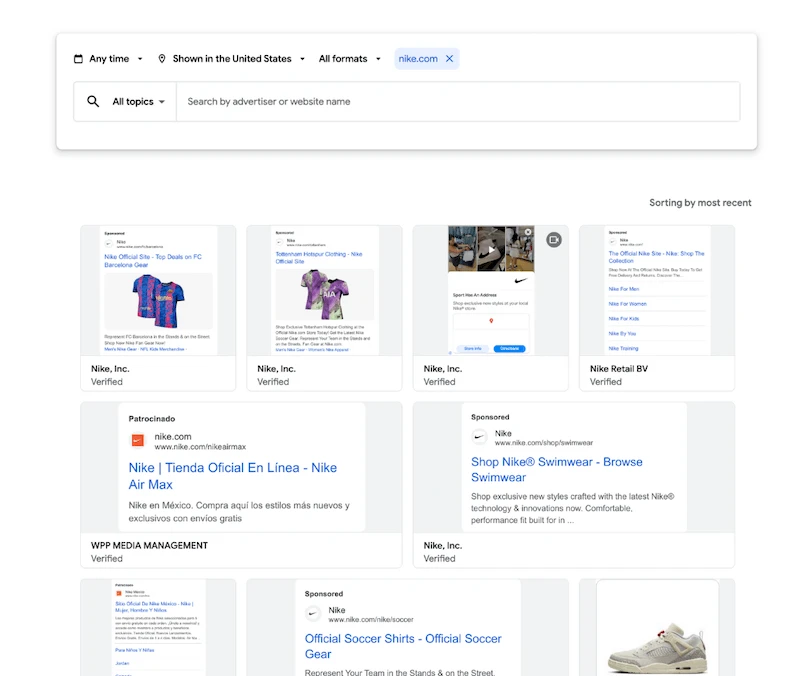
Here’s where the fun starts.
By looking at their ads, you can learn:
- How many ads are they running? More ads might mean they’re testing more options or spending more. Given this, would you need to check your own investment strategy?
- Are they using videos? Maybe YouTube is their go-to spot. If so, should you be there too?
- What are they saying in their Google ads? Maybe they’re targeting pain points you haven’t considered.
- What tactics get results? Scarcity tactics like limited-time offers? Freebies for first-time customers? Should you try them out too?
- What are their CTAs like? Do they invest more on awareness ads for ToFu? Or are they focusing on getting people to buy now?
- What do their ads look like? Live-action ads, cartoons, or real people’s videos? Are they using text overlays to highlight their message? If they’re trying something new, how can you do it better?
Borrow their audience, but bring your A-game
Targeting your competitor’s audience is like finding people who are already in the market for products like yours.
They’re already warmed up to the idea.
It’s way better than starting from scratch.
By hitting them with eye-catching ads, you can convince them to give you a try instead of your competitor.
But remember, it’s not just about short-term wins.
You have to double down on creating better campaigns.
Don’t worry because there’s a tonne of help available.
Google itself has guides and online tutorials to show you the ropes.
When you master targeting your competitor’s audience, you can watch your Google Ads campaigns take off – and you can do it again and again.
Keep tinkering the recipe based on what people respond to most.
This way, you’re constantly improving your approach –
and getting the best results possible.